BPMN template: Vulnerability management
From scan finding to patch: assess, rank by severity, emergency patch or regular patch cycle, exception with risk acceptance.
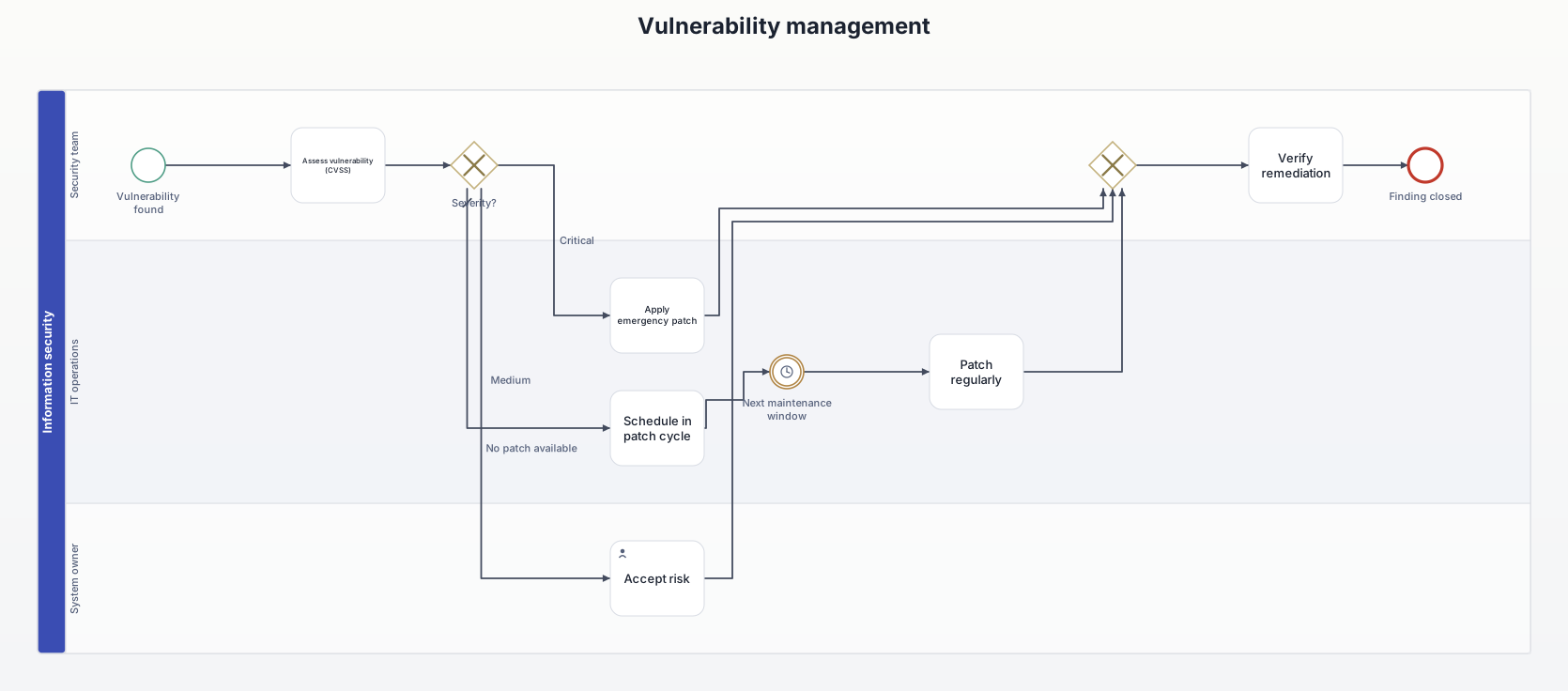
What this diagram is for
Documents how findings from vulnerability scans are handled, the way ISO 27001, NIS2 or customer audits expect to see it.
Roles (lanes and pools)
- Security team: assesses, steers, verifies.
- IT operations: applies patches.
- System owner: carries the residual risk when patching isn't possible.
Decisions and events
- Severity? Critical findings right away, medium ones in the next maintenance window, no patch available means a documented risk acceptance.
- Timer event: waits for the regular maintenance window.
All elements
| Element | Type | Role | Next |
|---|---|---|---|
| Vulnerability found | Start event | Security team | → Assess vulnerability (CVSS) |
| Assess vulnerability (CVSS) | Task | Security team | → Severity? |
| Severity? | Exclusive gateway | Security team | → Apply emergency patch [Critical] → Schedule in patch cycle [Medium] → Accept risk [No patch available] |
| Apply emergency patch | Task | IT operations | → Exclusive gateway |
| Schedule in patch cycle | Task | IT operations | → Next maintenance window |
| Next maintenance window | Intermediate event (timer) | IT operations | → Patch regularly |
| Patch regularly | Task | IT operations | → Exclusive gateway |
| Accept risk | User task | System owner | → Exclusive gateway |
| (merge) | Exclusive gateway | Security team | → Verify remediation |
| Verify remediation | Task | Security team | → Finding closed |
| Finding closed | End event | Security team | – |
Rebuild it in AIxFlow
Free: tap the start event, add the 11 elements one after another with +, add the roles as lanes, then tap “Arrange automatically” – AIxFlow does the rest.
Faster with Pro: describe the process in your own words or take a photo of a sketch, and the AI builds the diagram. Exporting a BPMN 2.0 file (for Camunda, bpmn.io, Signavio) is Pro as well.
BPMN modeling on iPad and Mac. Free for up to three diagrams.
Can I download the templates as .bpmn files?
No, this page is view-only. Rebuilding them in AIxFlow is free; exporting a .bpmn file is part of Pro.