BPMN template: Approval process
A request comes in, gets checked and is approved or rejected by a manager. The basic pattern behind almost every sign-off, from purchasing to budget release.
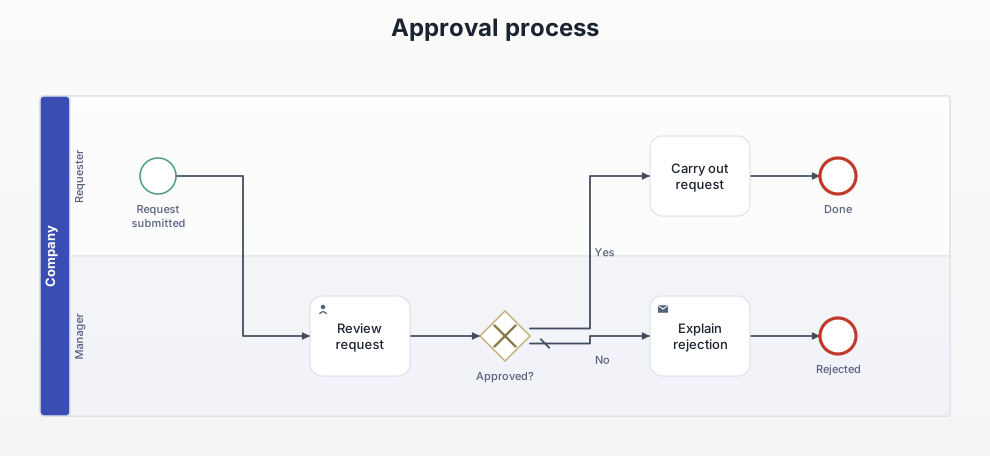
What this diagram is for
Shows who decides and what happens on rejection. The No branch is the part most process descriptions leave out.
Roles (lanes and pools)
- Requester: submits the request and carries it out once approved.
- Manager: reviews and decides.
Decisions and events
- Approved? The No branch is the default flow: without explicit approval the request counts as rejected.
All elements
| Element | Type | Role | Next |
|---|---|---|---|
| Request submitted | Start event | Requester | → Review request |
| Review request | User task | Manager | → Approved? |
| Approved? | Exclusive gateway | Manager | → Carry out request [Yes] → Explain rejection [No] |
| Carry out request | Task | Requester | → Done |
| Done | End event | Requester | – |
| Explain rejection | Send task | Manager | → Rejected |
| Rejected | End event | Manager | – |
Rebuild it in AIxFlow
Free: in AIxFlow choose “From template …”, open the “Approval workflow” template and adapt it to your process.
Faster with Pro: describe the process in your own words or take a photo of a sketch, and the AI builds the diagram. Exporting a BPMN 2.0 file (for Camunda, bpmn.io, Signavio) is Pro as well.
BPMN modeling on iPad and Mac. Free for up to three diagrams.
Can I download the templates as .bpmn files?
No, this page is view-only. Rebuilding them in AIxFlow is free; exporting a .bpmn file is part of Pro.