BPMN template: Incident management (ITIL)
A disruption is reported, logged by the service desk and resolved or escalated to 2nd level. With a timer for the service level.
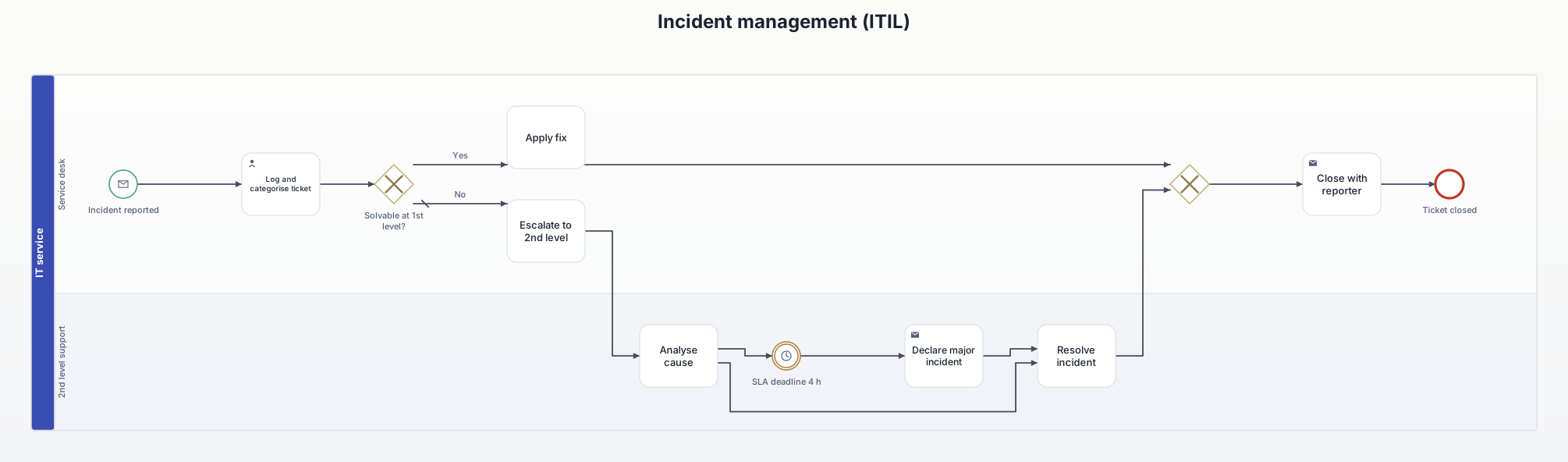
What this diagram is for
Shows the escalation levels and where the service level is measured. A basis for talks with service providers or for operations documentation.
Roles (lanes and pools)
- Service desk: first point of contact, logs, solves standard cases, closes.
- 2nd level support: analyses and resolves complex incidents.
Decisions and events
- Solvable at 1st level? Known errors are fixed by the service desk directly.
- SLA deadline: when time runs out, a major incident is declared. The 4 hours are an example value.
All elements
| Element | Type | Role | Next |
|---|---|---|---|
| Incident reported | Start event (message) | Service desk | → Log and categorise ticket |
| Log and categorise ticket | User task | Service desk | → Solvable at 1st level? |
| Solvable at 1st level? | Exclusive gateway | Service desk | → Apply fix [Yes] → Escalate to 2nd level [No] |
| Apply fix | Task | Service desk | → Exclusive gateway |
| Escalate to 2nd level | Task | Service desk | → Analyse cause |
| Analyse cause | Task | 2nd level support | → Resolve incident → SLA deadline 4 h |
| SLA deadline 4 h | Intermediate event (timer) | 2nd level support | → Declare major incident |
| Declare major incident | Send task | 2nd level support | → Resolve incident |
| Resolve incident | Task | 2nd level support | → Exclusive gateway |
| (merge) | Exclusive gateway | Service desk | → Close with reporter |
| Close with reporter | Send task | Service desk | → Ticket closed |
| Ticket closed | End event | Service desk | – |
Rebuild it in AIxFlow
Free: tap the start event, add the 12 elements one after another with +, add the roles as lanes, then tap “Arrange automatically” – AIxFlow does the rest.
Faster with Pro: describe the process in your own words or take a photo of a sketch, and the AI builds the diagram. Exporting a BPMN 2.0 file (for Camunda, bpmn.io, Signavio) is Pro as well.
BPMN modeling on iPad and Mac. Free for up to three diagrams.
Can I download the templates as .bpmn files?
No, this page is view-only. Rebuilding them in AIxFlow is free; exporting a .bpmn file is part of Pro.