BPMN template: Change management
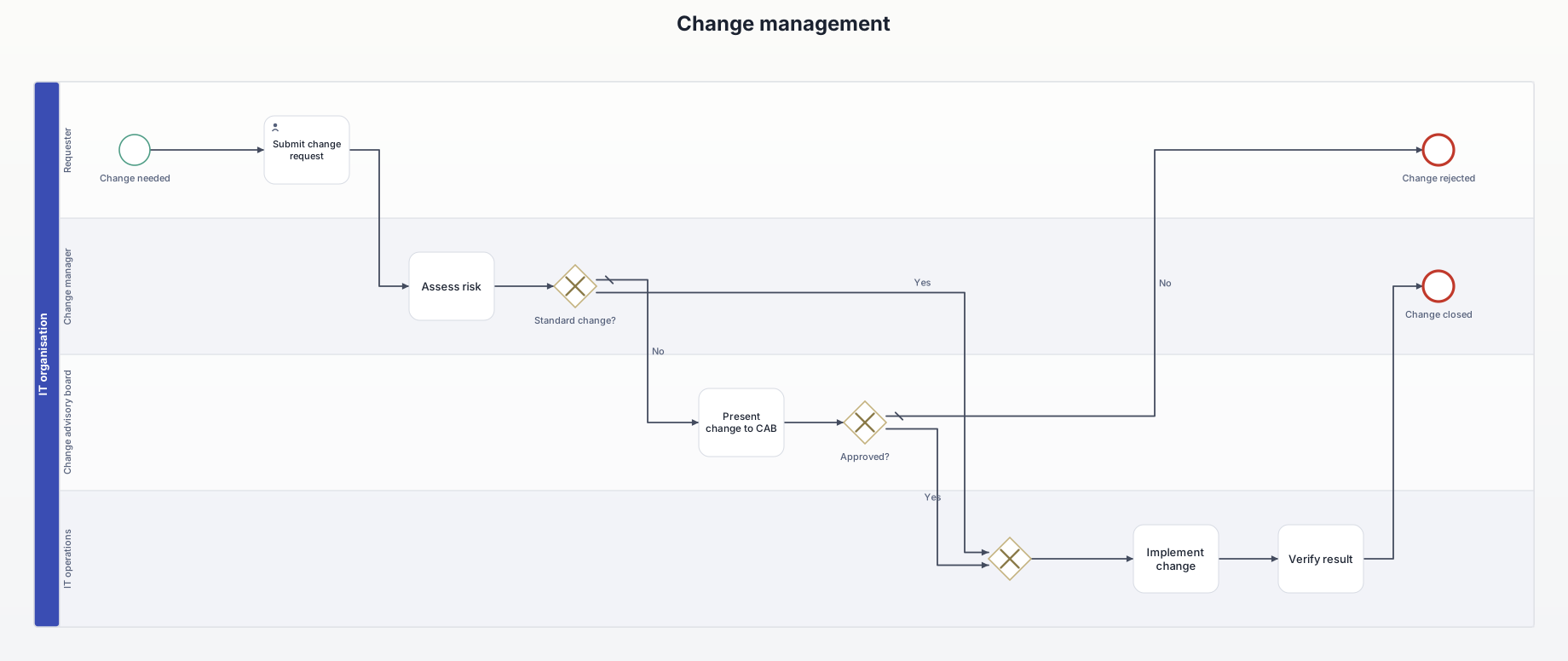
A change to IT systems is requested, assessed for risk, and implemented either directly as a standard change or after approval by the change advisory board.
What this diagram is for
Shows the difference between pre-approved standard changes and changes that need CAB approval, e.g. for ISO 27001 or ITIL audits.
Roles (lanes and pools)
- Requester: describes the change.
- Change manager: assesses risk and closes.
- Change advisory board: approves higher-risk changes.
- IT operations: implements and verifies.
Decisions and events
- Standard change? Pre-approved routine changes skip the CAB.
- Approved? A rejection ends the change.
All elements
| Element | Type | Role | Next |
|---|---|---|---|
| Change needed | Start event | Requester | → Submit change request |
| Submit change request | User task | Requester | → Assess risk |
| Assess risk | Task | Change manager | → Standard change? |
| Standard change? | Exclusive gateway | Change manager | → Exclusive gateway [Yes] → Present change to CAB [No] |
| Present change to CAB | Task | Change advisory board | → Approved? |
| Approved? | Exclusive gateway | Change advisory board | → Exclusive gateway [Yes] → Change rejected [No] |
| Change rejected | End event | Requester | – |
| (merge) | Exclusive gateway | IT operations | → Implement change |
| Implement change | Task | IT operations | → Verify result |
| Verify result | Task | IT operations | → Change closed |
| Change closed | End event | Change manager | – |
Rebuild it in AIxFlow
Free: tap the start event, add the 11 elements one after another with +, add the roles as lanes, then tap “Arrange automatically” – AIxFlow does the rest.
Faster with Pro: describe the process in your own words or take a photo of a sketch, and the AI builds the diagram. Exporting a BPMN 2.0 file (for Camunda, bpmn.io, Signavio) is Pro as well.
BPMN modeling on iPad and Mac. Free for up to three diagrams.
Can I download the templates as .bpmn files?
No, this page is view-only. Rebuilding them in AIxFlow is free; exporting a .bpmn file is part of Pro.