BPMN template: Employee offboarding
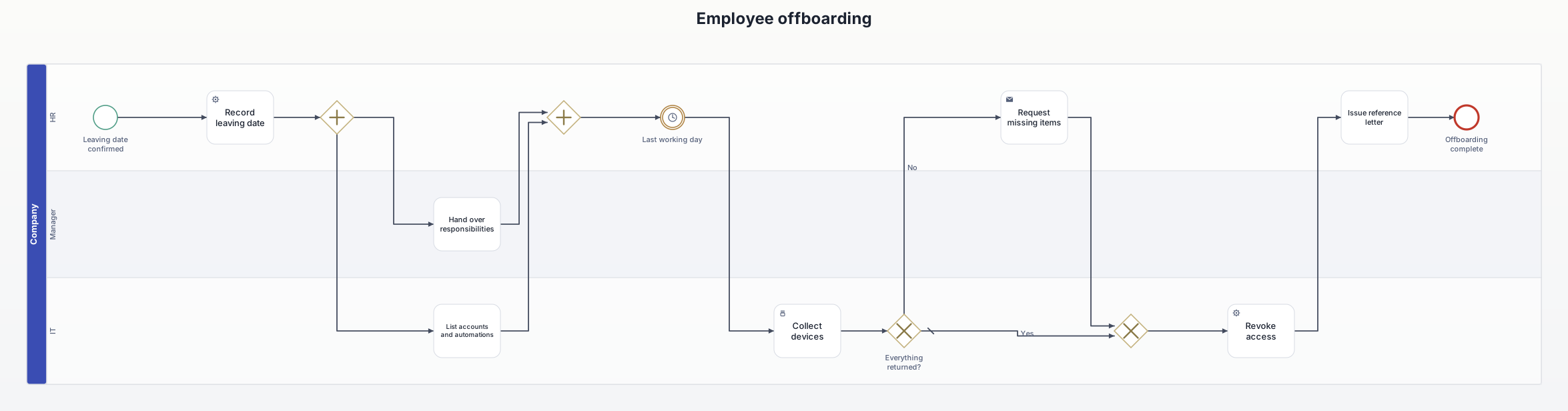
From the leaving date to the disabled account: handover and an inventory of accounts run in parallel, devices come back, and access is revoked last.
What this diagram is for
Shows what is easy to forget when someone leaves: the accounts, tokens and automations the person owns, and who takes over their work. Useful as evidence in ISO 27001 audits (return of assets, removal of access rights).
Roles (lanes and pools)
- HR: records the leaving date, requests missing items and issues the reference letter.
- Manager: reassigns responsibilities.
- IT: lists accounts and automations, collects devices and revokes access.
Decisions and events
- Parallel gateway: handover and inventory run at the same time, the second gateway waits for both.
- Timer event: the last working day.
- Everything returned? Missing devices are requested, then the process continues.
- Access is revoked last, so whatever breaks shows up while the handover is still fresh.
All elements
| Element | Type | Role | Next |
|---|---|---|---|
| Leaving date confirmed | Start event | HR | → Record leaving date |
| Record leaving date | Service task | HR | → Parallel gateway |
| (split) | Parallel gateway | HR | → Hand over responsibilities → List accounts and automations |
| Hand over responsibilities | Task | Manager | → Parallel gateway |
| List accounts and automations | Task | IT | → Parallel gateway |
| (merge) | Parallel gateway | HR | → Last working day |
| Last working day | Intermediate event (timer) | HR | → Collect devices |
| Collect devices | Manual task | IT | → Everything returned? |
| Everything returned? | Exclusive gateway | IT | → Exclusive gateway [Yes] → Request missing items [No] |
| Request missing items | Send task | HR | → Exclusive gateway |
| (merge) | Exclusive gateway | IT | → Revoke access |
| Revoke access | Service task | IT | → Issue reference letter |
| Issue reference letter | Task | HR | → Offboarding complete |
| Offboarding complete | End event | HR | – |
Rebuild it in AIxFlow
Free: tap the start event, add the 14 elements one after another with +, add the roles as lanes, then tap “Arrange automatically” – AIxFlow does the rest.
Faster with Pro: describe the process in your own words or take a photo of a sketch, and the AI builds the diagram. Exporting a BPMN 2.0 file (for Camunda, bpmn.io, Signavio) is Pro as well.
BPMN modeling on iPad and Mac. Free for up to three diagrams.
Can I download the templates as .bpmn files?
No, this page is view-only. Rebuilding them in AIxFlow is free; exporting a .bpmn file is part of Pro.